SceneIt
A Flask campus event dashboard that reads Gmail announcements, extracts event fields with Groq and stores them through SQLAlchemy.
Timeline
Event season
Role
Full Stack
Team
Team
Status
CompletedTechnology Stack
Key Challenges
- Turning model output into valid event dates and times
- Recognizing repeat announcements without a source message ID
- Separating scheduled ingestion from web requests
Key Learnings
- Parsing and validating LLM extraction output
- Modelling event interest with a many-to-many relationship
- Understanding the account boundary in Google Calendar integration
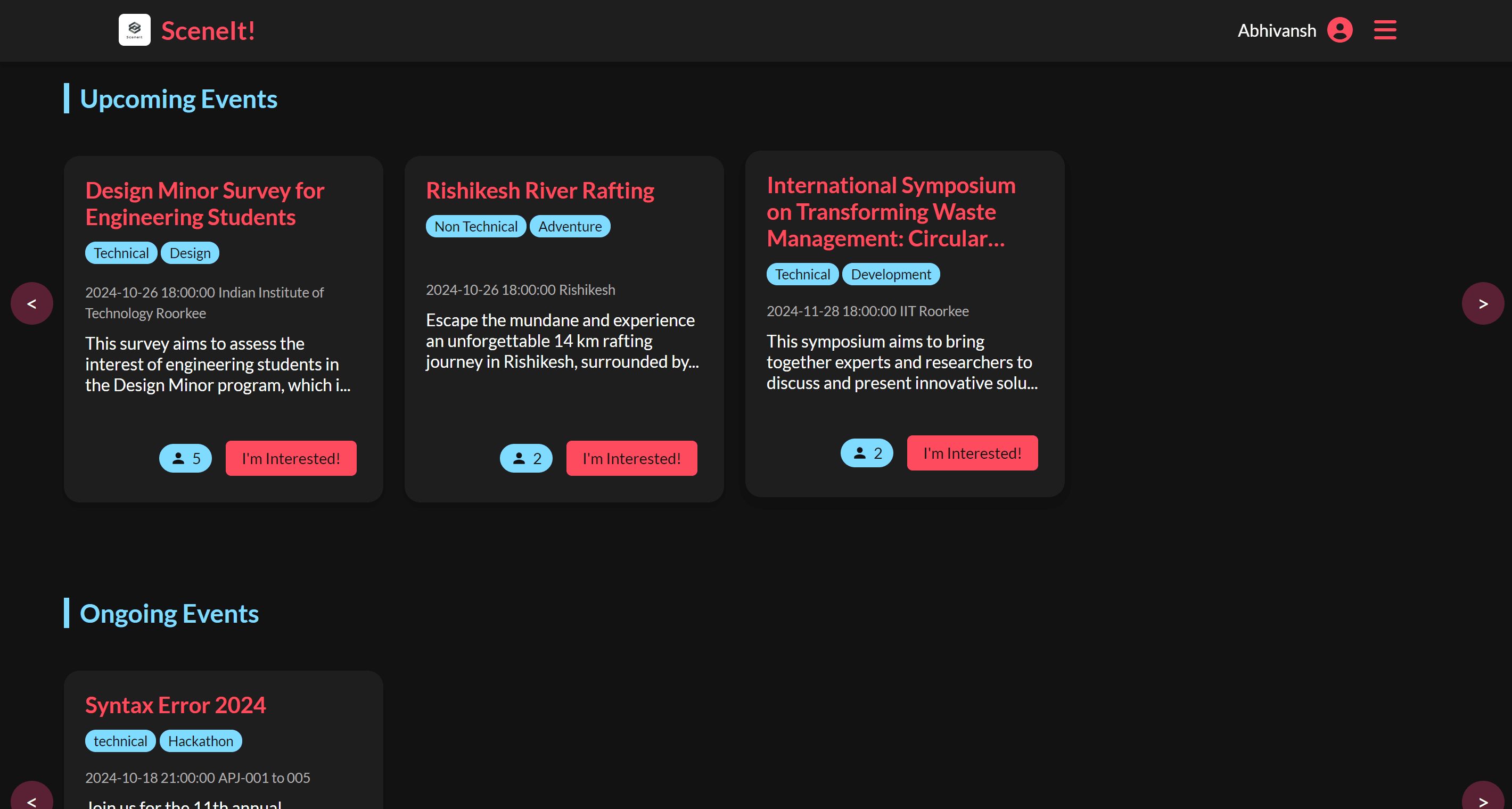
SceneIt collects campus event announcements from an inbox and presents them in a dashboard. Students can open an event, mark their interest and request a Google Calendar entry. Flask handles the routes, SQLAlchemy stores users and events, and a Groq model extracts fields from email text.
From an inbox message to an event record
mail_scraper.py
uses the Gmail API with read-only access. It lists inbox messages, fetches each
message and extracts the subject and decoded body. For multipart messages it
looks for a top-level text/plain part. It does not recursively traverse nested
MIME parts or process image attachments.
The ingestion function requests up to 100 messages per run. There is no pagination loop or stored Gmail message ID, so this is a repeated scan of a bounded inbox batch, rather than an incremental feed.
Each email goes to analyse_email. The prompt asks the model to identify club or workshop announcements and extract seven labelled fields: name, date, location, time, type, tag and description. It also supplies a fixed list of technical and nontechnical tags.
The configured model is llama3-70b-8192. Its response is plain text with labels,
not schema-constrained JSON. The expected format looks like this illustrative
example:
Event Name: Intro to Competitive Programming
Event Date: 2024-10-25
Event Location: Lecture Hall
Event Timing: 18:30
Event Type: Technical
Event Tag: CP
Event Description: A workshop on problem-solving techniques.
The distinction matters because the next stage depends on the spelling of
those labels. parse_event_data splits lines at the first colon, normalizes
recognized keys and appends continuation lines to the previous field. Missing
fields become Not specified.
Validation decides what reaches the database
The parser and insertion functions live in main.py. Date parsing accepts four formats. An event with an unparseable date is skipped. Time parsing accepts three formats; an unparseable or missing time becomes 18:00. Duration defaults to 60 minutes.
Those defaults keep incomplete announcements usable, but they also create values the email may never have supplied. An extracted time and a fallback time are stored in the same field, without a flag distinguishing them. If I changed this pipeline, I would retain that distinction so the dashboard could show “time unconfirmed” instead of presenting a guessed time as settled.
Before inserting, the importer searches for an event with the same name and date. If it finds one, it updates its location, time, type, description, tag and duration. Otherwise it creates a record. The session commits each event and rolls back if the write fails.
Matching on name and date handles repeat announcements when extraction is consistent. It can also merge two events with the same name on the same day, or create duplicates when the model phrases a title differently. Keeping the source message ID and original text would make those cases easier to trace.
Scheduling is part of the web process
APScheduler runs the import job at midnight and noon in the scheduler's
configured timezone. Startup creates the tables with db.create_all() and
starts the scheduler. /update_events also runs an import immediately and
starts another scheduler.
This setup couples background work to the Flask process. Starting several web workers would also start several schedulers, and repeatedly using the manual route can create additional schedulers. The scheduled callback does not explicitly enter a Flask application context, despite using Flask-SQLAlchemy. That is another detail to resolve when making ingestion reliable outside a request.
I would move scheduling into a dedicated worker and keep a record of each run: which messages were processed, which extractions failed and which events were updated. That would also remove the model calls from the manual route's request path.
The dashboard and interest data
The Event model stores the extracted fields and timestamps. A join table,
user_event_interest, connects users and events with a composite primary key.
POST /mark_interest/<event_id> toggles that relationship and returns the new
interest state and count.
The number displayed on a card is the number of interested users. It is not a measurement of attendance, even though parts of the template use attendee labels.
Flask passes serialized events into a Jinja template, and JavaScript builds the cards and expanded detail view. Users log in with an eight-digit roll number and password; Werkzeug handles password hashing and Flask-WTF supplies form validation and CSRF protection.
The home route groups events by date and start time. Future dates are upcoming; events today whose start time has passed are ongoing; earlier dates go into the feedback section. That leaves today's later events out of the upcoming list, and an event remains ongoing after its duration has elapsed. These are query rules to correct before treating the sections as an accurate event timeline.
What adding to Calendar actually does
The Calendar endpoint combines the stored date and time, calculates an end time
from the duration and calls
quickstart.put_event.
The inserted entry contains the event name and start/end times, using
Asia/Kolkata as its timezone.
Google authorization comes from a local token file shared by the application. The helper writes to that authorized account's primary calendar. The student session gates the endpoint, but it does not select a separate Google account for each student. Per-user calendar writes would require a separate OAuth flow and token storage keyed to the logged-in user.